OFFLINE MEDIA PLAYER · WINDOWS

hurricane-
party

Save YouTube videos and MP3s to disk. Play them when the internet is down.
↓Download for Windows
hurricane-party-windows.zip · v0.6.0 · 125 MB
No installer: unzip anywhere, run the exe. Windows 11.
A capybara in a yellow rain jacket holding a boombox over his head
THE FIRST MINUTE

Three things, then it plays.

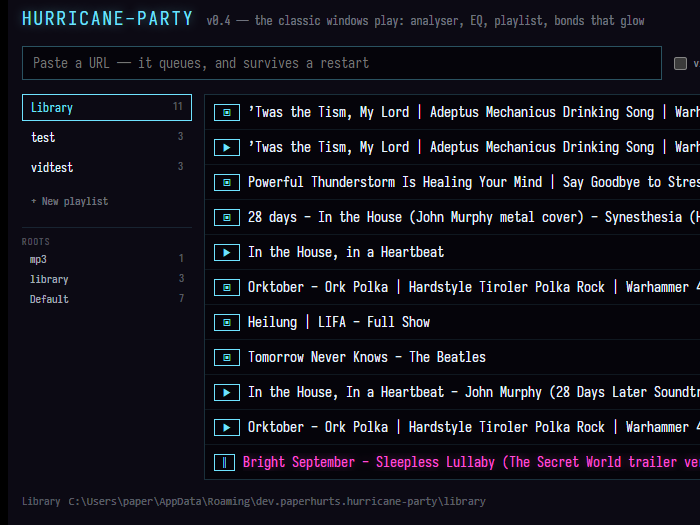
The library window with a URL pasted and a download finishing in the queue
1

Paste a URL. A video, or a whole YouTube playlist: you pick what to keep before anything downloads. It queues, downloads into your library folder, and survives a restart.
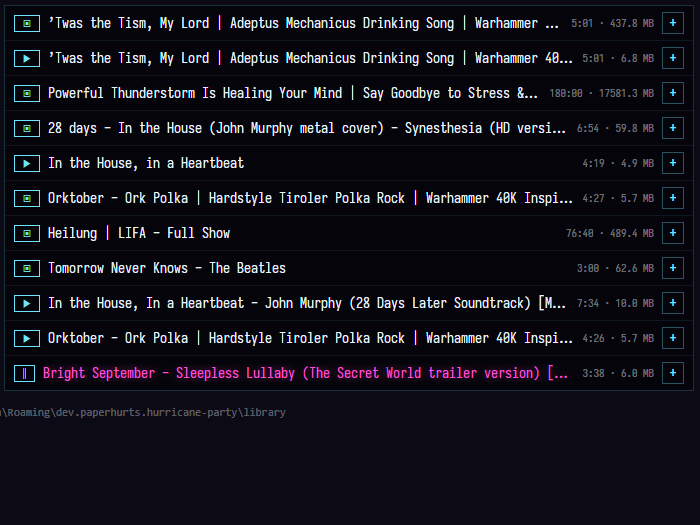
The library window listing tracks and videos
2

Add a folder of MP3s. Music you already own goes in the same library.
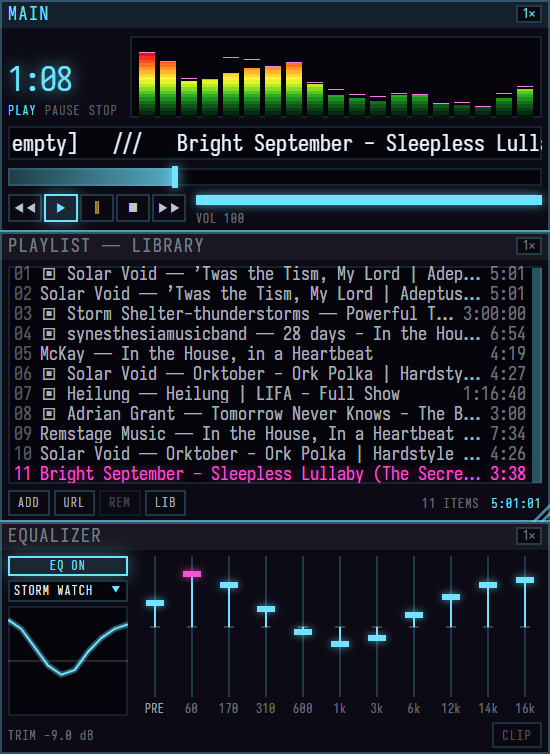
The Main, EQ and Playlist windows bonded together with a track playing
3

Press play. Three small windows that snap together. If you remember Winamp, you already know how this works.

WHAT WINDOWS WILL SAY

The first time you run it, Windows will stop you.

A blue panel titled Windows protected your PC appears. That is SmartScreen, and it says the same thing about every program it has not seen before.

Click More info, then Run anyway. It asks once.

Why: hurricane-party is a one-person project and the exe is not code-signed. A signing certificate costs a few hundred dollars a year and would only make this panel go away. The source is public if you want to check what you are running.

WHAT YOU WILL SEE
Windows protected your PC
Microsoft Defender SmartScreen prevented an unrecognized app from starting. Running this app might put your PC at risk.
1More info
2Run anyway
WHAT IT IS, AND ISN'T

Offline first. Nothing on the network at playback, ever.

IT IS
A downloader and a player in one small app.
Your files, in a folder you chose, as ordinary MP3 and MP4.
Built to be used in the dark with the power out. The screen is the only light in the room, so there is no light mode. Even the bright theme glows.
IT ISN'T
No accounts. No cloud. No sync. No streaming.
No telemetry, no update pings. When you press play it cannot reach the network even if it wanted to.
Not a product. One engineer's tool for riding out hurricane season, shared as-is.

The zip is 125 MB for a 10 MB app because yt-dlp, ffmpeg and a JavaScript runtime ride along inside it. They do the downloading and the MP3 conversion; hurricane-party is what you look at.

BEFORE THE STORM

Hurricane Party Planning: paste it all, press once.

A window of its own, opened from the library. Paste everything you want before the weather turns — videos, whole playlists, one link per line. It reads each line, says what your library already has, and adds up what the rest comes to in video and in audio side by side, against the room left on your drive.

One press queues all of it. A download that fails because the connection went waits a minute and tries again instead of giving up, so a batch started while the power is flickering finishes on its own. Closing the window stops nothing.

A line that isn't a link, a video that has gone private, a list that won't read: each says so on its own line and holds nothing else up.
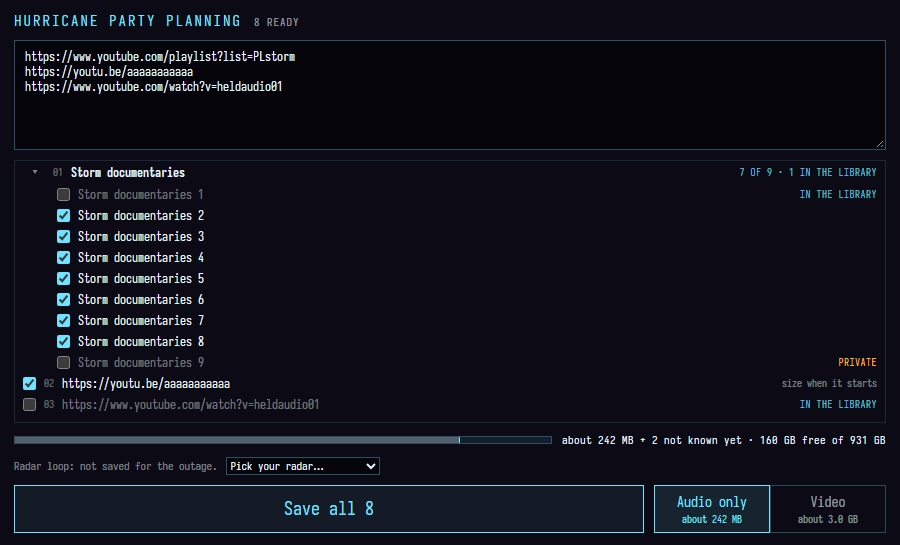
WHAT ONE PRESS SAVES
01a playlist, nine videos
02a video
03one you already have
About 242 MB as audio, or 3.0 GB with the video. 160 GB free on the drive.
Save all 8
The Hurricane Party Planning window: three pasted links, the first a playlist opened to its nine videos with two of them already in the library, a size for the batch in audio and in video, and a Save all 8 button
HURRICANE PARTY PLANNING · ONE BOX, ONE PRESS
THE RADAR
Cone is a second theme: the weather radar for a station you pick, redrawn in the analyser's colours, sitting behind the windows with the warnings for that area. It fetches on a timer, never while a track is playing, and always says how old the picture is.
THE BUDGET
The library footer shows what it all takes and what is left on the drive, and every folder shows its own size. Set a ceiling if you want one: crossing it warns you and queues anyway. Nothing is ever held back without saying so.
AUDIO ONLY
Any video can be audio instead, before it starts or halfway through: it pauses, switches and carries on. A video already on disk gives up its MP3 without downloading again.
THE CHECKS
Every download is fingerprinted as it lands, and after launch the library is read back quietly in the background, slowly enough that it never fights the music. A file that changed, went short or stopped opening is marked on its row, with Accept or Download again beside it. Better to find out the day before.
A FLASH DRIVE
Keep some of the library on a stick. While it is unplugged its tracks are hidden from the list and from what plays, and one line offers to show them. Plug it back in and they return, even if Windows gave the drive a different letter.
LISTS THAT FILL THEMSELVES
Search the library, then save the search as a smart playlist: everything by one artist, every video, everything added this week. A download that matches joins it on its own; a track you remove leaves it.

Files dropped into a library folder by hand show up about two seconds later, with no rescan. Downloads go wherever you point them, and a download whose folder is missing waits for it rather than landing somewhere else.
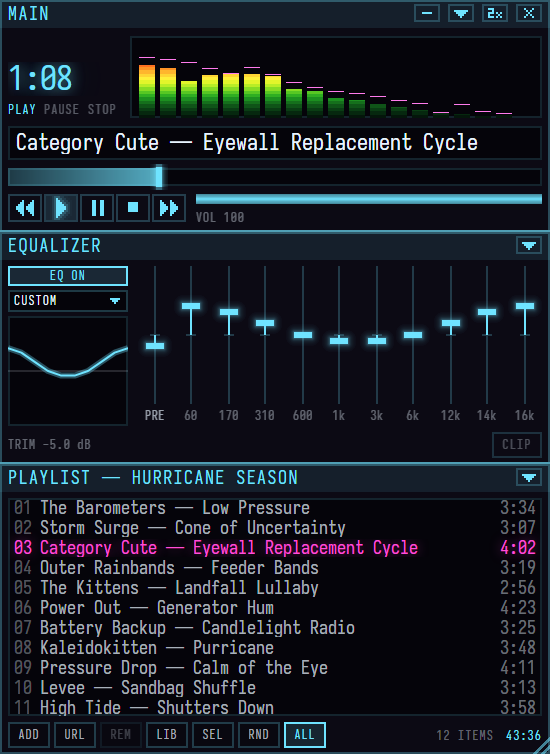
THE WINDOWS

Three small windows that snap together. Drag one, they all come.

Main, EQ and Playlist bonded in a stack in the Eyewall skin, a track playing and the analyser lit, at 2x
MAIN

Transport, time, seek, volume. The analyser runs on a weather radar ramp: green through yellow to red, peaking magenta. Click it for an oscilloscope.

EQUALIZER

Ten bands, a preamp, and a trim that keeps a boosted mix from clipping. A lamp lights when it does. Save the curve as your own preset, or import presets from Winamp .eqf files.

PLAYLIST

Resizes by the corner grip. Shuffle and repeat live in its bar. The lit seam between windows is a bond: drag it to resize both neighbours, double-click to break it.

The Main window collapsed to a fourteen-pixel bar: transport, the track title, the clock
WINDOWSHADE

Double-click Main's title bar and it collapses to a fourteen-pixel bar that stays on top. Title, transport, time. This is the one you live in while working in another app.
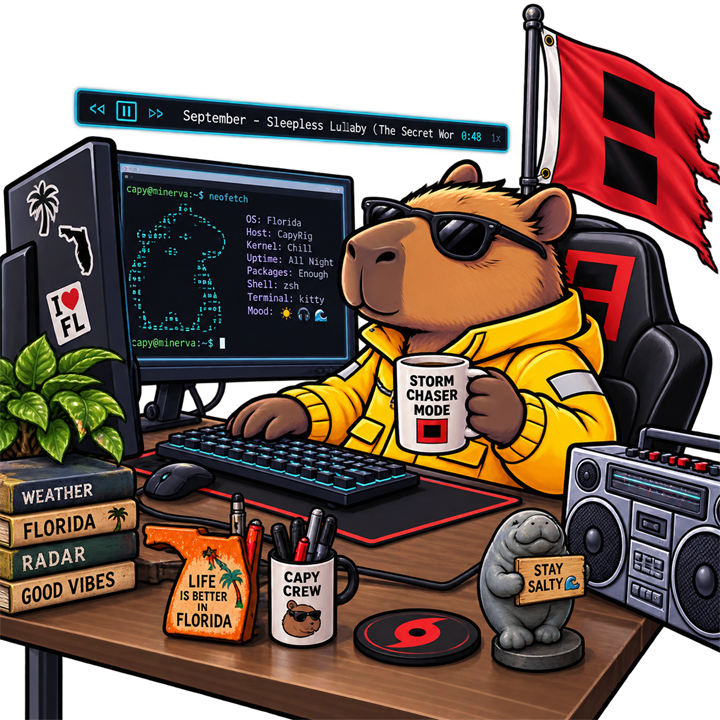
The capybara at a desk in headphones, the windowshade bar floating above his terminal
SKINS

Wear an old Winamp skin, or make one of your own.

IMPORT SKIN…
Classic .wsz skins load and dress all three windows. Most work. If a skin uses something this player doesn't have, it says so instead of drawing it wrong.
MAKE A SKIN…
Pick any picture. The windows take its colours, kept readable, and wear the picture behind the buttons. You choose which part of it shows.
PAINT YOUR OWN…
A folder opens with a numbered template. Paint over it in any image editor, then bring the folder or a zip of it back in.
PURRICANE

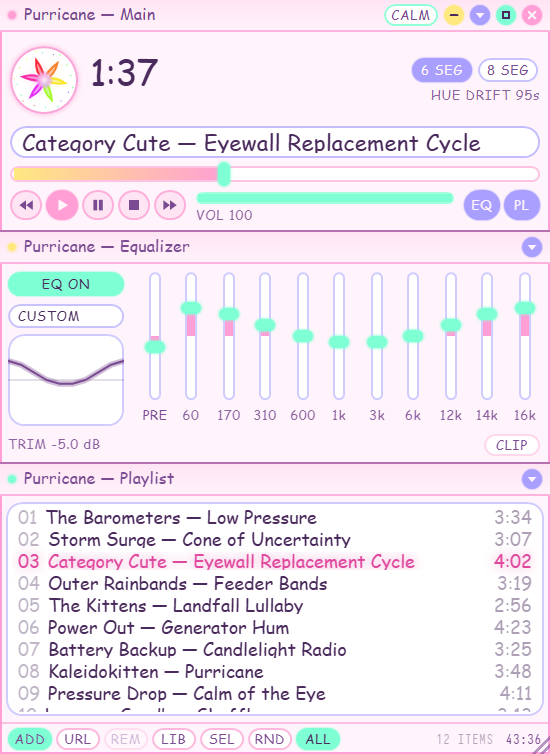
A second theme, and a kaleidoscope that blooms on the beat.

Main, EQ and Playlist in Purricane: rounded pastel pink windows, mint and periwinkle pills, and a round kaleidoscope badge on Main, a track playing, at 2x
THE THEME

Pick Purricane beside the skin in the library and every window turns over at once. It comes with a skin of its own: soft rounded chrome in floss pink, milk white, mint, periwinkle and butter, with words in Comic Sans.

THE KALEIDOSCOPE

A mandala sits in the round badge on Main. Bass pushes it out, the highs scatter dots at the rim, a beat makes it bloom, and its colour drifts once around the palette every minute and a half. 6 SEG and 8 SEG cut it into six or eight.

CALM

It turns slowly and never flashes more than a few times a second, whatever the tempo. CALM holds it still and lets it answer the music in size only. Windows' reduced-motion setting does the same.


Three kaleidoscope badges playing the same track: six segments, eight segments, and calm, smaller and in one colour
6 SEG8 SEGCALM
The capybara in the bed of a red pickup, boombox on his shoulder, hurricane warning flag flying
FOR TINKERERS

A control pipe and a viz stream.

The player listens on a named pipe. Anything on the machine can ask what is playing, skip, seek, or read the analyser as a stream of frames, which is enough to drive an LED rig from the bass. The protocol is unstable until v1.0. docs/control-api.md has the handshake and the message table, and the repo's tools folder has two PowerShell clients to start from.
FAQ

Questions a stranger asks.

The capybara with his boombox in front of a red hurricane warning flag
Where did my files go?
Into the library folder, whose path is shown at the bottom of the library window. They are plain MP3 and MP4 files; any other player can open them.
Does it need the internet?
Only to download. Playback never touches the network, by design and by enforcement. Unplug and it keeps going.
Doesn't the radar need the internet?
The radar does, and only if you pick the Cone theme. It fetches on a timer, never while a track is playing, and it always tells you how old the picture is. Everything else stays off the network, playback included.
Can I keep music on a flash drive?
Yes: add the drive's folder as a library folder. While the drive is out, its tracks are hidden from the library and from what plays, with one line offering to show them. Plug it back in and they come back, even under a different drive letter.
How would I know a file had gone bad?
It tells you. Every download is fingerprinted when it lands, and the library is checked over quietly after launch. Anything that changed, went short, or stopped opening is marked on its row, with the choice to accept it as it is or download it again.
Why is it Windows only?
It was built for one Windows machine in hurricane country. Nothing in it is Windows-specific on purpose, but nothing has been tested anywhere else either.
Can I use my old Winamp skins?
Yes. Import skin… in the library reads a classic .wsz. Most skins work, and one that uses something this player doesn't have tells you what it left out.
Is there a light mode?
No, and there won't be. There is a bright theme, Purricane, pastel pink with a kaleidoscope, and Eyewall, the dark one it ships in.
Is my library shared anywhere?
No. There is no account and no server. The list of what you have lives in a database file on your disk.
The download is broken. Who do I tell?
Open an issue on GitHub. If the link on this page is dead, the release list is the fallback.